Site Building Mode is the setting that decides whether CloudCannon builds The process of converting all your Site files into a single, functional website using the method specified by your SSG. Building on CloudCannon is optional, but is required for specific features, such as the Visual Editor, preview screenshots for output files in your Collection Browser, and the Testing Domain and Custom Domain. A website in CloudCannon that includes all the files, content, configuration, and settings needed to edit, build, and host a complete website.Build
Site
The Site Building Mode setting only appears for Sites that use Unified Configuration A single configuration approach in CloudCannon that consolidates all Site settings, build options, and editing configurations into one comprehensive system, simplifying site management and reducing complexity. As of October 2024, CloudCannon uses the Unified Configuration format for all new Sites. Sites created before this date can also upgrade to the Unified Configuration format.Unified Configuration
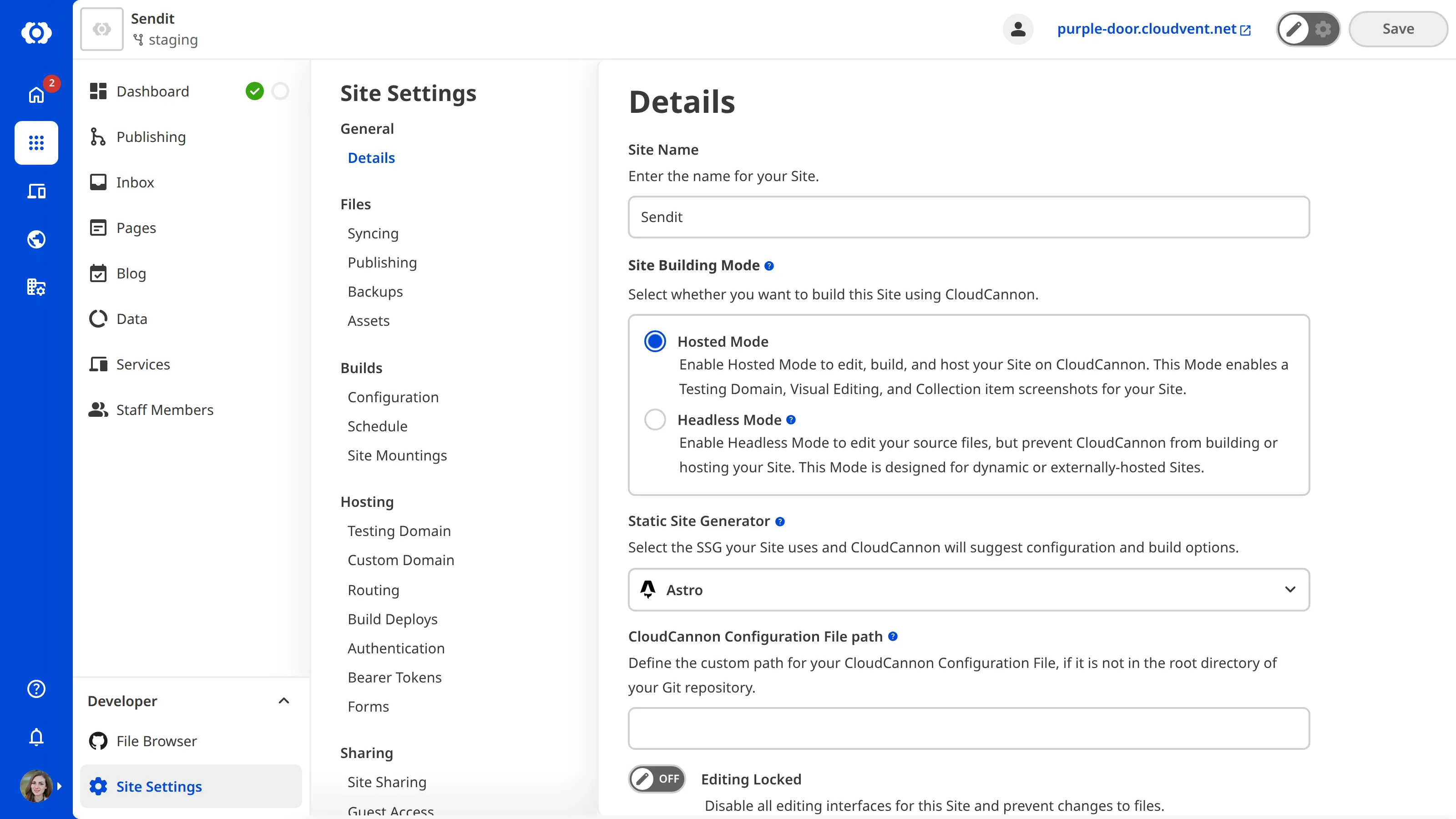
Hosted Mode#
In Hosted Mode, CloudCannon builds your Site and hostsß the build output. Hosted Mode is the default for new Sites, and gives your Site:
- A free Testing Domain, where you can preview your built Site.Glossary term
Testing Domain
A free .cloudvent.net URL that CloudCannon assigns to every Site for reviewing your live website content after a successful Site build. Each Testing Domain uses a randomly generated adjective and noun separated by a hyphen. By default, CloudCannon automatically de-indexes Testing Domains so that they do not appear in search engines.
- The Visual Editor, where your team can edit content on a preview of the page.Glossary term
Visual Editor
CloudCannon's visual editing interface provides a user-friendly way of updating your website files on an interactive preview of your webpage. You can navigate around your website preview using links/buttons, as you would on the live version, and edit your content inline on the page, or with the data panel or sidebar. What you see in the Visual Editor is what your website visitors will see on your live webpages.
- Preview screenshots of the files in your Collectionbrowsers.Glossary term
Collection
A group of related files with a similar format (e.g., a folder of pages, blog posts, or data files). Once you group your files into Collections, they appear in the Site Navigation for easy access.
- The option to serve your Site on a Custom Domain.Glossary term
Custom Domain
A domain you own and connect to your CloudCannon Organization, so visitors reach your Site at your own address instead of its Testing Domain. You buy the domain from a domain registrar, connect it to your Organization, then add it to your Sites.
Choose Hosted Mode if CloudCannon builds your Site, even if another provider serves it to visitors, or if you want your team to edit with the Visual Editor. For more information, please read our documentation on what a Site build is and what a subdomain is.
Headless Mode#
In Headless Mode, CloudCannon doesn't build or host your Site. Your team can still edit your source files in CloudCannon, and CloudCannon saves their changes to your files as usual. A Site in Headless Mode has no Testing Domain, Visual Editor, or Collection screenshots, and can't be served on a Custom Domain.
Choose Headless Mode if your Site is dynamic, such as a Site that uses server-side rendering, or if another provider builds and hosts it. For more information, please read our documentation on what Headless Mode is and what external hosting is.
Switch Site Building Mode#
Changing the mode of a Site requires permission to edit its details (the site:settings:details:write permission), which members of the Owners and Developers Default Permission Groups hold. You select the mode on the Details page under Site Settings, then click the Update Details button.
Switching to Headless Mode opens the Switch to Headless Mode? modal, where you click the Turn off hosting and builds button to confirm. If your Site has built, switching takes it offline straight away and stops any further builds. CloudCannon won't switch a Site that has a Custom Domain to Headless Mode, so remove the Custom Domain from your Site first. For more information, please read our documentation on enabling Headless Mode and removing a Custom Domain from your Site.
You can switch back to Hosted Mode at any time, without a confirmation step. If a Site in Headless Mode hasn't built yet, the build task on the Summary tab of its Site Dashboard shows a Turn off headless mode button, which switches it back.
Set the mode for new Sites#
New Sites use Hosted Mode. To create a Site in Headless Mode, set mode to headless in the .cloudcannon/initial-site-settings.json file in your repository. For more information, please read our documentation on configuring your initial Site settings.