Deploy Previews are available on our Team or Enterprise plan.
Want to chat about whether this feature is right for you? Our support team is always happy to hear from you.
Deploy Previews Deploy Previews are a set of automations that CloudCannon can run whenever a Pull Request is opened, closed, or updated in your Git Repository. When enabled, CloudCannon can post a comment on each Pull Request with details of any connected Sites, and automatically create and delete a Site for each Pull Request. This lets your team review and edit changes in CloudCannon before a Pull Request is merged. A Git feature that proposes changes to a repository and allows for review before merging. In CloudCannon, Pull Requests are one method of publishing changes from a Site to its Publish Branch. Unlike direct merging, Pull Requests require approval before changes are combined. A storage location for the code and files that make up your website. CloudCannon supports the repository providers GitHub, GitLab, and Bitbucket, and highly recommends using a repository to store your website's files for better version control and collaboration. A way to group multiple Sites from the same Git Repository, allowing you to define a main branch, as well as branching and publishing rules. You can access the Projects Browser using the Projects link in the App Sidebar.Deploy Preview
Pull Request
Git Repository
Project
- Creating a Sitein CloudCannon for the Pull Request branch, and deleting that Site when the Pull Request is merged or closed.Glossary term
Site
A website in CloudCannon that includes all the files, content, configuration, and settings needed to edit, build, and host a complete website.
- Posting a comment to the Pull Request in your Git Provider with the Site Name, Build Status (e.g., Ready), Testing Domain, Site Dashboard, Build Logs, and the latest commit.Glossary term
Testing Domain
A free .cloudvent.net URL that CloudCannon assigns to every Site for reviewing your live website content after a successful Site build. Each Testing Domain uses a randomly generated adjective and noun separated by a hyphen. By default, CloudCannon automatically de-indexes Testing Domains so that they do not appear in search engines.
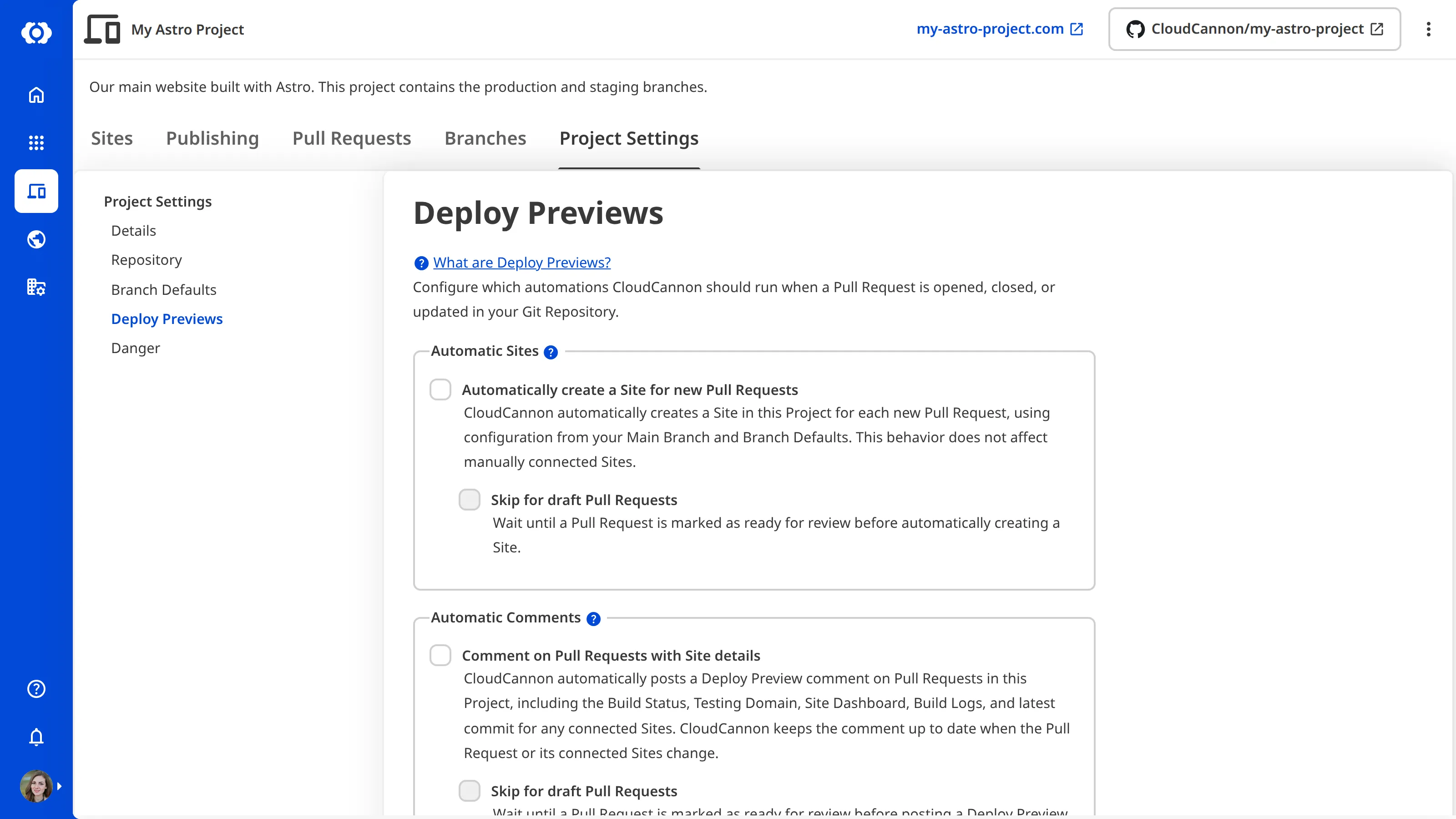
You can independently enable the Automatic Comments and Automatic Sites automations. For more information, please read our documentation on using Deploy Previews to trigger Site creation and deletion and using Deploy Previews to comment on a Pull Request.
Deploy Previews may take a few minutes to appear for recently created Projects, as CloudCannon needs to correctly connect the webhook from your Git Provider.
Listening to Pull Requests#
When you connect a Project to GitHub, GitLab, or Bitbucket, CloudCannon subscribes to Pull Request events on your Git Repository. CloudCannon processes the following events:
- Opened — A new Pull Request is created.
- Reopened — A previously closed Pull Request is reopened.
- Ready for review — A draft Pull Request is marked as ready (GitHub
ready_for_review, GitLabupdate, Bitbucketpullrequest:updated). - Converted to draft — A Pull Request is reverted to a draft.
- Edited — The Pull Request title, description, or base branch changes (GitHub
edited, GitLabupdate, Bitbucketpullrequest:updated). - Closed or merged — The Pull Request is closed without merging, or merged into its base branch.
Each event is routed to your Project based on the Git Repository identifier and your connected Git Provider. CloudCannon then reconciles your Project settings against the current state of the Pull Request and performs the enabled automations.
If both Automatic Comments and Automatic Sites are disabled for your Project, CloudCannon still logs these events, but takes no action.
Enabling and disabling Deploy Preview automations#
Deploy Previews are intentionally lazy. Turning these automations on does not retroactively process historical Pull Requests:
- Existing Pull Requests only receive an Automatic Comment on the next event (such as a new push or a reopen). If you need an immediate comment on an already-open Pull Request, trigger any small change to the Pull Request.
- CloudCannon does not backfill for existing Pull Requests when Automatic Site creation is turned on for a Project. Sites are only created on the next Pull Request event.
- CloudCannon does not delete existing Automatic Sites orphaned from previously closed Pull Requests when Automatic Site deletion is turned on for a Project. Sites are only deleted on future close or merge events.
Disabling an automation setting is similarly lazy, with one exception: disabling Automatic Comments or changing the comment footer runs a single reconciliation across every open Pull Request. Existing Automatic Comments are updated to show a disabled notice or refreshed with the new footer content (or lack thereof). For more information, please read our documentation on using Deploy Previews to comment on a Pull Request.
Supported providers and repositories#
Deploy Previews are supported for Projects connected to GitHub, GitLab, or Bitbucket. If your Project is connected through GitHub Enterprise Server, behavior matches GitHub Cloud. Self-hosted GitLab instances behave like GitLab Cloud provided the webhook is reachable from CloudCannon.
Automation errors#
Network failures and Git Provider API errors during Automatic Comment or Automatic Site operations are reported to CloudCannon's error tracker and do not abort the rest of the Pull Request event. This means a transient failure updating one Site will not prevent other Sites on the same Pull Request from being updated.
For step-by-step instructions on enabling these features, please read our documentation on configuring Deploy Previews.