A Pull Request template allows you to define the default values for the title and body of your Pull Requests. You can also configure any Inputs used by your Pull Request. If you have multiple templates on your Site, you can choose which template you want to use when creating a Pull Request.
These instructions assume you use Pull Requests as the publishing method for your Site.
To configure a Pull Request template:
- Navigate to your File Browser and open your CloudCannon Configuration File in the Source Editor, or open it in your local development environment.
- Identify the
pull_request_templateskey, or create one at the root level of your Configuration File. - Add an array item under the
pull_request_templateskey. - (Optional.) Add any other configuration keys (e.g.,
label,title,body) under your array item. - Save your changes.
CloudCannon will update the list of available Pull Request templates on the Publishing page.
Configuration options#
Here is an example of two Pull Request templates using some of the most commonly used configuration keys.
pull_request_templates:
  - label: Update content
    _inputs:
      title:
        options:
          required: true
      body:
        type: markdown
        options:
          bold: true
          italic: true
          link: true
          format: p h1 h2 h3
  - label: Delete content
    title: Delete content
    _inputs:
      title:
        options:
          disabled: true
    template_path: .github/templates/delete-content.md
{
"pull_request_templates": [
{
"label": "Update content",
"_inputs": {
"title": {
"options": {
"required": true
}
},
"body": {
"type": "markdown",
"options": {
"bold": true,
"italic": true,
"link": true,
"format": "p h1 h2 h3"
}
}
}
},
{
"label": "Delete content",
"title": "Delete content",
"_inputs": {
"title": {
"options": {
"disabled": true
}
}
},
"template_path": ".github/templates/delete-content.md"
}
]
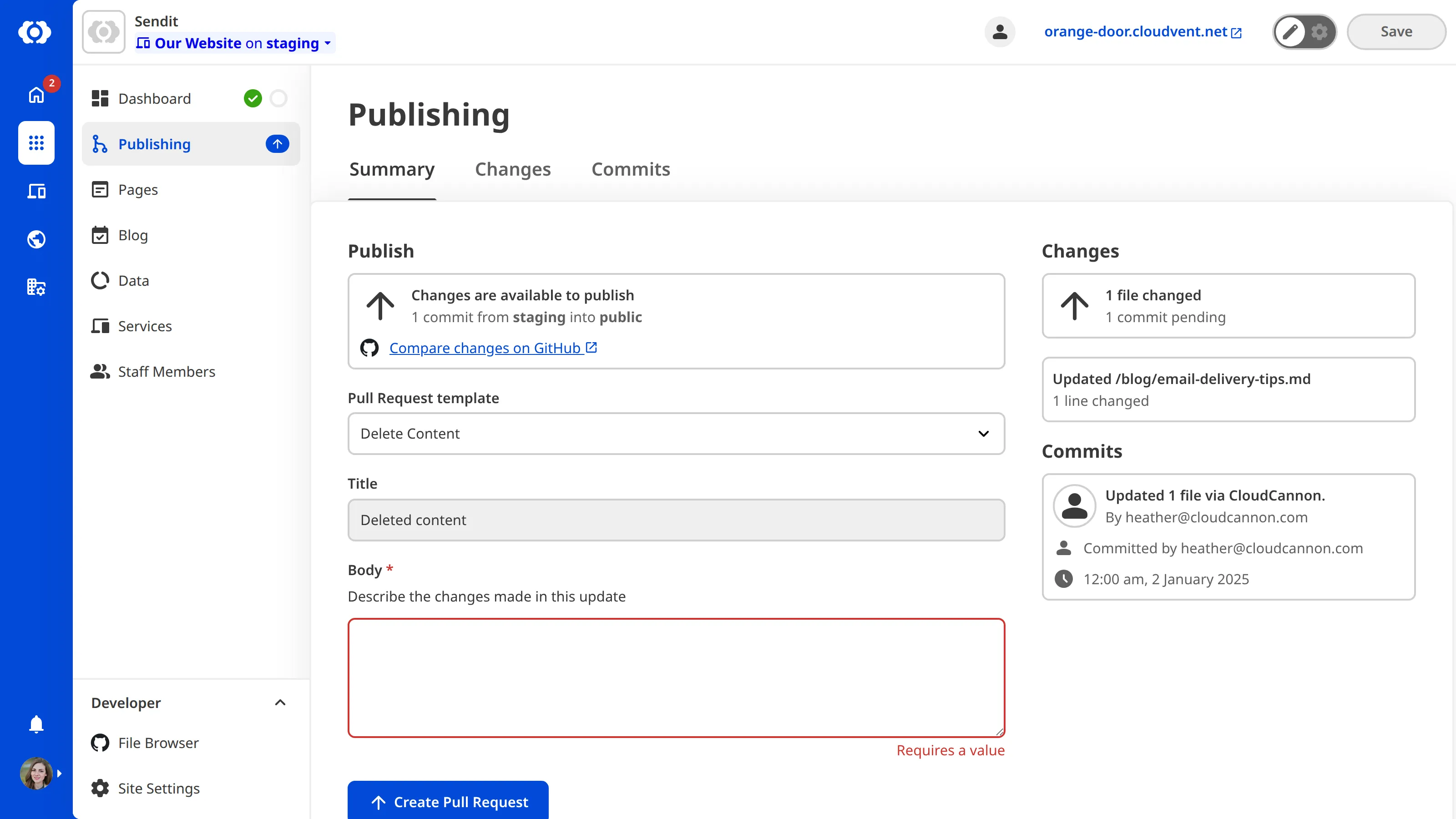
}The name of the first Pull Request template is "Update content", which is visible in the dropdown menu on the Publishing page.
We have configured the title Input in this Pull Request template. CloudCannon will require a value for this Input before you can create the Pull Request.
We have configured the body Input in this Pull Request template. You can edit the content of the body Input using a limited set of Markdown formatting options.
We have configured the title Input in this Pull Request template. CloudCannon will not allow you to change the value of the title Input as the disabled option is true.
We want the body field in our Pull Request template to use the content of the .github/templates/delete-content.md file by default.
These keys configure the Pull Request templates available on your Site.
This key defines the options for Pull Request templates.
The following nested keys are available for each entry in the pull_request_templates array:
-
label -
title -
body -
template_path -
_inputs
This key has no default.
Show exampleHide example
In this example, we have two Pull Request templates in the pull_request_templates array.
pull_request_templates:
  - label: General changes
    _inputs:
      title:
        options:
          required: true
      body:
        type: markdown
        options:
          bold: true
          italic: true
          link: true
          format: p h1 h2 h3
  - label: Delete content
    title: Delete content
    _inputs:
      title:
        options:
          disabled: true
    template_path: .github/templates/delete-content.md
{
"pull_request_templates": [
{
"label": "General changes",
"_inputs": {
"title": {
"options": {
"required": true
}
},
"body": {
"type": "markdown",
"options": {
"bold": true,
"italic": true,
"link": true,
"format": "p h1 h2 h3"
}
}
}
},
{
"label": "Delete content",
"title": "Delete content",
"_inputs": {
"title": {
"options": {
"disabled": true
}
}
},
"template_path": ".github/templates/delete-content.md"
}
]
}This key defines the name of a Pull Request template, which appears in the dropdown menu on the Publishing page.
This key has no default.
Show exampleHide example
In this example, the name of the Pull Request template in the dropdown menu on the Publishing page will be "Content Update".
pull_request_templates:
  - label: Content Update
    title: Updates to...
    body: In this update, I have made the following changes...
{
"pull_request_templates": [
{
"label": "Content Update",
"title": "Updates to...",
"body": "In this update, I have made the following changes..."
}
]
}This key defines the default value of the "Title" field in your Pull Request.
This key has no default.
Show exampleHide example
In this example, the title field of our Pull Request template is populated by the string "Updates to..." by default.
pull_request_templates:
  - label: Content Update
    title: Updates to...
    body: In this update, I have made the following changes...
{
"pull_request_templates": [
{
"label": "Content Update",
"title": "Updates to...",
"body": "In this update, I have made the following changes..."
}
]
}This key defines the default value of the "Body" field in your Pull Request.
This key has no default.
Show exampleHide example
In this example, the body field of our Pull Request template is populated by the string "In this update, I have made the following changes..." by default.
pull_request_templates:
  - label: Content Update
    title: Updates to...
    body: In this update, I have made the following changes...
{
"pull_request_templates": [
{
"label": "Content Update",
"title": "Updates to...",
"body": "In this update, I have made the following changes..."
}
]
}This key defines the path to the file CloudCannon should use as the value of the body field in a Pull Request template. This file path must be relative to the root of your repository (i.e., /, not the value of source). This allows you to create more complex default content for your Pull Request.
CloudCannon will not use the content of this file if the body key is also defined for the Pull Request template.
This key has no default.
Show exampleHide example
In this example, the body field of our Pull Request template is populated by the contents of .github/templates/delete-content.md by default.
pull_request_templates:
  - label: Delete content
    title: Delete content
    _inputs:
      title:
        disabled: true
    template_path: .github/templates/delete-content.md
{
"pull_request_templates": [
{
"label": "Delete content",
"title": "Delete content",
"_inputs": {
"title": {
"disabled": true
}
},
"template_path": ".github/templates/delete-content.md"
}
]
}This key defines which inputs are available at a given level of the configuration cascade.
The following nested keys are available for each input inside _inputs:
*.type*.label*.comment*.context*.hidden*.disabled*.instance_value*.cascade*.options
This key has no default. If undefined at higher levels of the configuration cascade, _inputs will default to any values configured in the CloudCannon configuration file.