Your Billing Period The recurring cycle CloudCannon bills your Organization on for its Subscription Plan, either monthly or yearly. You can switch between billing periods at any time, and CloudCannon prorates the difference on your next invoice. A workspace in CloudCannon that groups together Sites, Organization Members, and shared resources. It is also the unit CloudCannon bills for. You can define permissions for your Organization, controlling the access each Organization Member has to resources on CloudCannon. You can create and be a part of multiple Organizations. A set of features available to your Organization, the monthly usage limits for resources, and the price you pay for access to those features and resources, monthly or annually. Each Organization in CloudCannon can have one Subscription Plan, and can update or cancel at any time.Billing Period
Organization
Subscription Plan
Paid Subscription Plans are billed monthly or yearly:
- Monthly — Your card is charged at the start of each month for the month ahead.
- Yearly — Your card is charged once a year for the year ahead. The yearly price works out cheaper per month than paying monthly.
Even if you select Yearly as your Billing Period, CloudCannon still invoices you monthly for any Overages The extra usage charged when your Organization exceeds its plan's included limits and Overages are enabled. Overage usage appears on your next invoice.Overage
You can switch between Billing Periods at any time. When you change your Billing Period partway through a Billing Period, CloudCannon prorates the difference, and any adjustment appears on your next invoice.
If your Organization is on a Free Trial A trial period that gives a new Organization access to Standard Plan features without requiring a payment method.Free Trial
To update your Billing Period:
- Navigate to the Subscription page under Org Settingsin the App SidebarGlossary term
Org Settings
The settings page for a CloudCannon Organization, where organization administrators can manage organization-wide settings, including billing, team permissions, integrations, branding, and security policies. You can access this page using the Organization Settings link in the App Sidebar.
.Glossary termApp Sidebar
The left-most UI panel in the CloudCannon app. This panel contains links to your Organization Home, Sites, Projects, Domains, and Org Settings pages, as well as app Updates and your Avatar.
- Click the Review your Subscription Plan button in the billing summary. CloudCannon will open the Your Subscription Plan page.
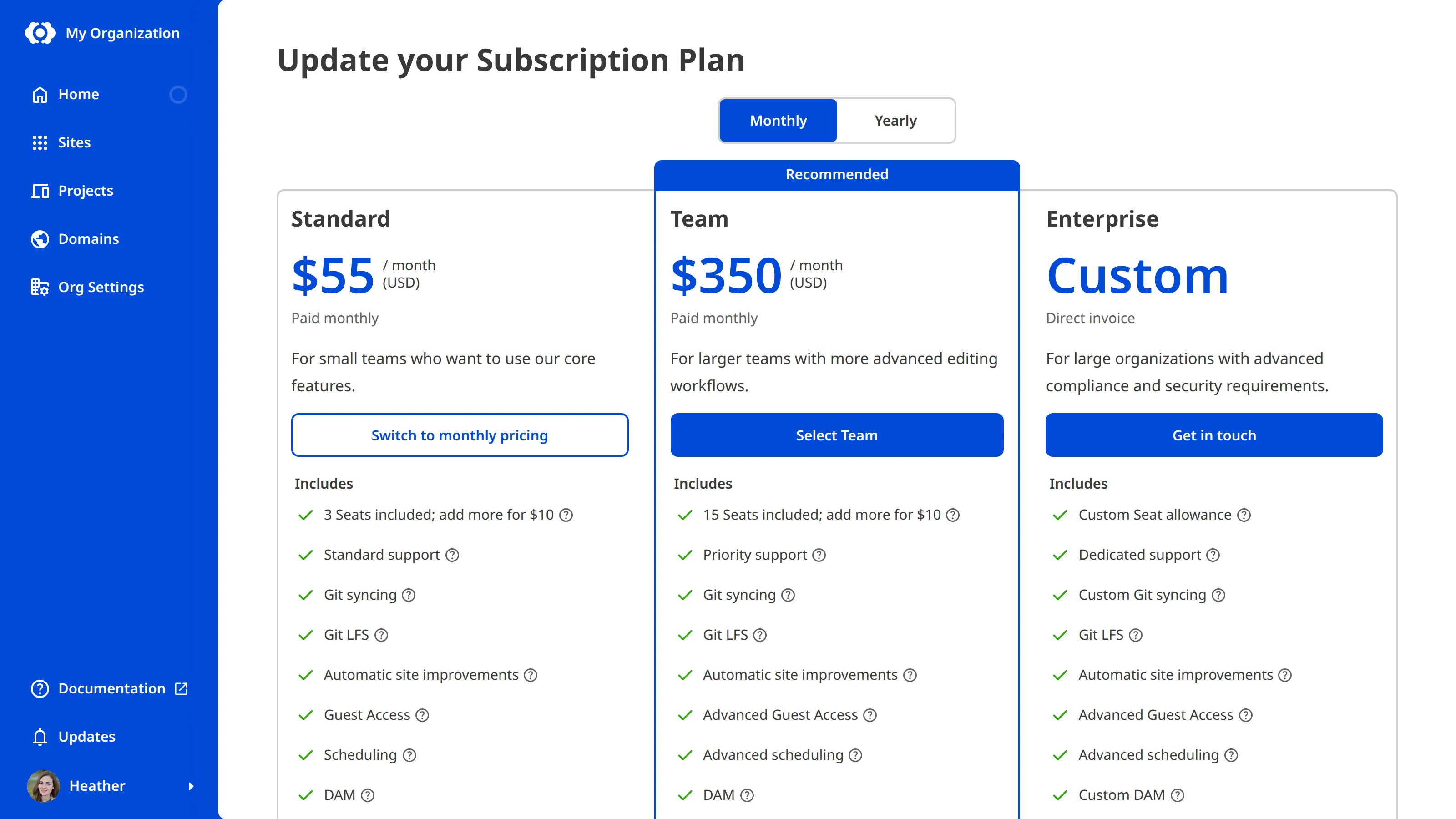
- Click the Change your Subscription Plan button. CloudCannon will open the Update your Subscription Plan page.
- Use the Billing Period toggle at the top of the page to choose Monthly or Yearly billing.
- On your current Subscription Plan, click the Switch to annual pricing or Switch to monthly pricing button. CloudCannon will open the Your Subscription Plan page.
- Review the Plan resources and Estimated bill.
- Click the Complete checkout button.
CloudCannon will update your Billing Period immediately.
If your Organization is on an Enterprise Plan, your billing is arranged directly with your CloudCannon account manager. Self-serve Billing Period changes aren't available. For questions about Enterprise billing, please contact us via support, Slack, or email with your Organization name and the change you would like to make.