ELEVENTY CMS

The Eleventy CMS for all your projects

Keep your Eleventy workflow. Give editors a visual way to update content without touching your code.

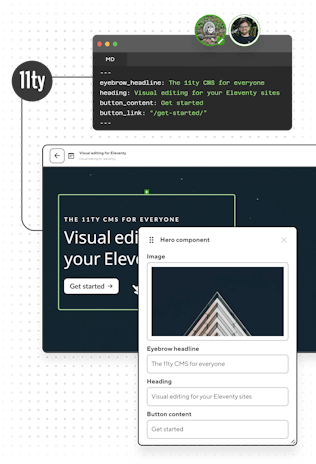
Visual editing for your Eleventy sites

Same repo. Different view.

Your Eleventy files stay in your repository. Editors commit through CloudCannon, while you keep complete control over your includes, layouts, shortcodes, and plugins.
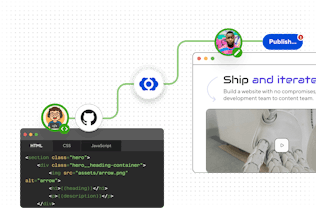
Screenshot of Git workflow in CloudCannon

Branch-based editing and publishing

Content teams can easily branch new sites for content changes, then preview and publish — all without dev intervention.

CloudCannon's Git-based CMS →

Visual editing that understands Eleventy

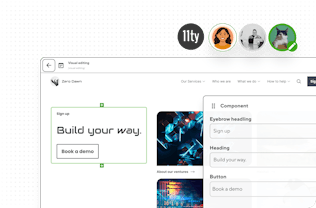
Content teams edit using your actual components: no rebuilding, no architectural compromises, no workflow disruptions. Just instant live previews.
Visual Editing on CloudCannon →

Screenshot of CloudCannon's Visual Editor and active users
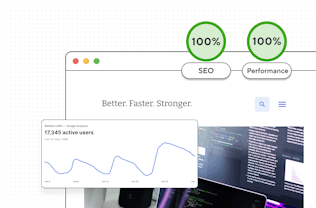
Screenshot of analytics for a CloudCannon site

Eleventy's speed with top-tier performance

Keep your PageSpeed scores high with Eleventy's simpler static site generation and CloudCannon's (optional) global high-speed CDN.

Load instantly. Rank higher. →

Less maintenance. More building.

Shrug off maintenance burdens that consume your dev time. Create new Eleventy sites in minutes with your reusable page components.
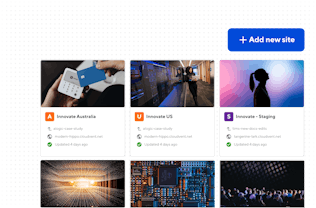
Maintain less. Build more. →

Screenshot of CloudCannon's Visual Editor and active users

Real results from real migrations

Developer intelligence platform DX migrated to CloudCannon as their Eleventy CMS.
The results? A 400% increase in leads generated and annual savings of $150,000.

Three steps to visual editing with Eleventy

1

Build with Eleventy

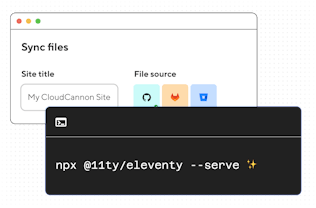
Build your Eleventy site locally with your preferred stack and structure.
2

Configure with CloudCannon

Configure collections, set editing rules, and transform your shortcodes and content blocks into visual components.
3

Hand off confidently

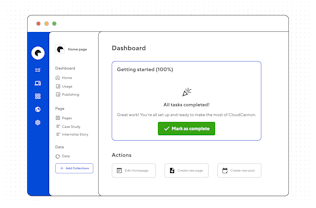
Hand off to non-technical editors who can update content visually — without touching your code.

Frequently asked questions

Which templating languages do you support?

For building, the ones Eleventy supports. Nunjucks, Liquid, WebC, Markdown, HTML, JavaScript, Handlebars, and the rest all build normally, including projects that mix several in one repo. CloudCannon runs your build rather than reimplementing it, so that part is really an Eleventy question.

Live visual editing is narrower. Component editable regions, where an editor changes a prop and the component re-renders on the page as they type, are Liquid only. That covers .html files too, since Liquid is Eleventy's default processor for those. Other templating languages still edit perfectly well: the Content Editor works regardless, and so does the Visual Editor. You just don't get the live component re-render.

Do my plugins and .eleventy.js config still run?

Yes. The build is an ordinary install-and-build: your dependencies come from package.json, your config file runs, and your plugins do whatever they do locally. Image plugins, syntax highlighting, RSS, custom filters and collections all behave as normal. You can add prebuild and postbuild steps if you need something extra in the pipeline.

The Visual Editor is the more interesting case. If your Liquid components rely on filters or shortcodes defined in .eleventy.js, our editable regions package bundles those into your build, along with any dependencies and plugins they use, so the components can render live in the browser while an editor types.

A few things genuinely can't run client-side. For those you’d define an editing fallback that the Visual Editor uses, while the real plugin still runs in your build, so what ships is unchanged.

Which Eleventy version do you use?

Yours. The version in package.json is the version that builds, so upgrades are a commit rather than a support ticket. If your project needs a particular Node release, you can pin it.

How do editors use my shortcodes and includes?

Through Snippets. You define each shortcode once in your CloudCannon config, describing its arguments as editor inputs, and writers insert it from a menu while they’re editing. What gets written to the file is the same Liquid or Nunjucks shortcode you’d have typed, so nothing about your build changes.

Shortcodes inside a registered Liquid component are a different case and need no Snippet configuration. They're picked up from your Eleventy config and bundled for the browser, along with any imports they depend on, as described above.

What’s the difference between Eleventy collections and CloudCannon collections?

They solve different problems. Eleventy collections are computed at build time from tags and glob patterns, and they drive your templates. CloudCannon collections are folder-based groupings that shape the editing interface: which files appear together, what a new entry looks like, who can create one. Most projects end up with them roughly aligned, but you can define CloudCannon collections for folders Eleventy never turns into a collection at all.

Can editors change global data?

YAML and JSON files in _data are editable through the Data Editor, which is where menus, site settings, and team lists usually live. JavaScript data files are a different case: they run at build time and often pull from an API, so they aren’t editable content. If a .js data file holds values your clients need to change, moving those values into a .json file alongside it is the usual fix.

You aren't limited to _data either. A data folder is just a collection with disable_url: true, which tells CloudCannon the entries don't build to a page of their own. Point that at any folder you like, and define as many as your project needs. Most sites stick with _data and one collection, but the option is there if your structured content wants splitting up.

Do I have to use Editable Regions?

No. Editable Regions is an optional feature for visual editing, and plenty of Eleventy sites run on CloudCannon without it. It’s a great feature to keep in mind if you want editors building pages from components, so they can add, reorder, and nest content blocks with live previews. But if your editors will only ever touch blog posts and a handful of structured fields, you’re free to skip it.

Can I keep my hosting where it is?

Yes. Hosting through CloudCannon is optional. Connect CloudCannon to the same repository your current host watches, and editor commits trigger your existing deploy. Alternatively, let CloudCannon run the build and commit the output back to a branch you deploy from. Both approaches are documented.

No vendor lock-in. Period.

Your Eleventy code and content stay in Git.
Your repos stay yours.

Tiaan Fairchild

Software Engineer

A friendly CloudCannon dev sitting ready for a demo call