Deploy Previews for better visibility, wherever your team works


When you open a pull request in GitHub, GitLab, or Bitbucket, CloudCannon can now build a live preview of your Site for that branch, with the full editing experience you’d get on any CloudCannon Site, then comment back on the pull request so the rest of your team can find it. Developers stay in their Git workflow. Content editors and managers can open the previews in CloudCannon, check the real pages, and sign off before anything merges.
We built Deploy Previews partly to smooth out our own workflows. Every release day, someone on our engineering team spent about ten minutes gathering each open pull request and its preview Site into a single Slack post so the rest of the team could find them. That ritual was really about one thing: letting everyone see the same work, wherever they happen to be working. Now CloudCannon can post those details on the pull request the moment one opens, and surface every PR as a preview inside the CMS.
How it works Direct link to this section
Customers on Team plans and above can turn Deploy Previews on or off for each Project they own. When a PR opens, CloudCannon can build a Site for that branch, with its own build, testing domain, and the same editor you use everywhere else in CloudCannon. It can also comment back on the pull request with the build status, a link to the live preview, and another link directly back straight to the CloudCannon Site. These two automations are both optional and independent, so you can run one without the other, or neither if you’d prefer.
The main idea is visibility in both directions. A developer working in their editor, or straight from their Git provider, gets a comment on the PR pointing to the preview. A content editor or manager working in CloudCannon sees the same work as a real Site they can open and edit. Nothing your team is building stays stuck on one side.
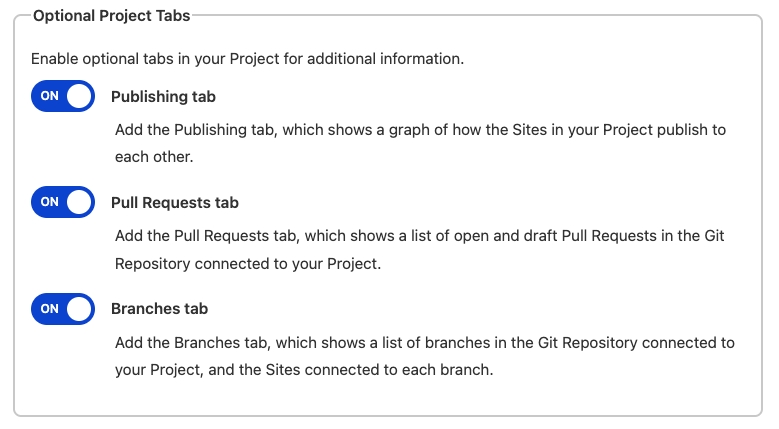
Two new optional tabs in your Project help make this concrete. The Pull Requests tab shows what’s open and which previews are attached. The Branches tab gives you the same picture from the branch angle. Both tabs have quick actions available to users, without digging through settings. Even better, both of these new tabs are available on every plan, and you can choose whether to make them visible to your users.
In practice that means a reviewer can open the Pull Requests tab, see every open PR in the order they were last updated, and click into a working version of the site. They can read the actual page immediately, in CloudCannon, and they can approve the real thing rather than a picture of it.
Edit the preview, don’t just look at it Direct link to this section
Plenty of hosts offer deploy previews. Most give you a static build that isn’t easily pulled into a CMS, a snapshot you can look at but can’t easily change. Your previews on CloudCannon are fully editable Sites, presented within the CMS. A reviewer can open it and edit the content, with the same editor they already use everywhere else in CloudCannon. That matters most when the person reviewing isn’t a developer and what they care about is the words, the images, and the layout, not the diff.
It also fits how we think about CloudCannon in general. Some people want to work locally or in their IDE. Some want to work in the CMS within a browser. Some barely leave their Git provider. We’d rather fit around all of them than make everyone funnel through one workflow. Deploy Previews let a developer stay in their pull request and a content editor stay in CloudCannon, both looking at the same work.
Pull requests from outside your team Direct link to this section
For security reasons, CloudCannon won't automatically build a Site for pull requests opened from a fork. Any fork PRs get a comment explaining this, with a path to connect a Site by hand once your team has looked the changes over and decided they’re trustworthy. CloudCannon spots a fork PR the same way across GitHub, GitLab, and Bitbucket, so this behavior is consistent wherever your code lives.
If you’re running an open repo, or working with freelancers and external contributors, that’s the behavior you want.
Switch it on whenever you're ready Direct link to this section
Deploy Previews are available on Team plans and above. You’ll really start to feel the value once you’ve got a few people working in parallel and more than one of them needs to see what’s going on.
The Pull Requests and Branches tabs are slightly different. Because they add visibility to everyone working with Git (and therefore everyone on CloudCannon!), they’re free on every plan to turn on or off as you like.
To turn Deploy Previews on, open a Project, go to Project Settings, and find the Deploy Previews section. Automatic Sites and automatic PR comments are separate switches, and you're also able to add a custom footer to the comments, and decide whether draft pull requests should be included in either case.
One preview, wherever your team works
Developers can stay in Git. Editors and managers see the same work inside the CMS.


