ASTRO CMS

The Astro CMS for all your projects

Keep your Astro workflow. Give editors a visual way to update content without touching your code.
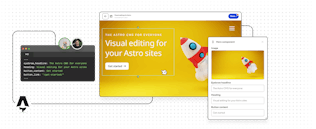
Visual editing for your Astro sites

Git for devs. Visual for editors.

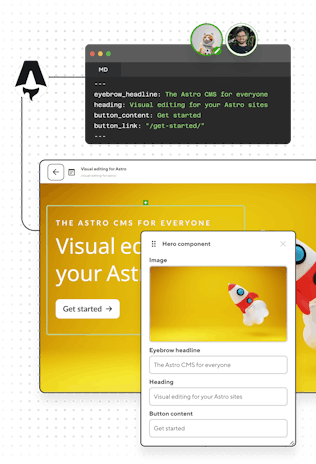
With CloudCannon as your Astro CMS, everything lives in your repository. Editors commit through CloudCannon's interface while you keep complete control over code, components, and architecture.

AI-ready for Astro

Astro stores everything as flat files in Git — Markdown, frontmatter, components, config. That's the same format LLMs were trained on, which makes a CloudCannon + Astro project something an agent can read from the first commit.

Need some assistance? Our agent-skills repo helps to automate the process of migrating Astro projects to CloudCannon.

The AI-ready CMS →

Screenshot of CloudCannon's Visual Editor and active users
Screenshot of Git workflow in CloudCannon

Branch-based editing and publishing

Content editors work on branches, preview on staging sites, then commit their changes to publish. You work locally with zero conflicts.

CloudCannon's Git-based CMS →

Empower your team with intuitive editable regions

Remove the technical barrier for content editors. By defining editable regions directly in your Astro components, you allow your team to make visual updates in real time without touching a line of code.

Visual Editing on CloudCannon →

Screenshot of CloudCannon's Visual Editor and active users
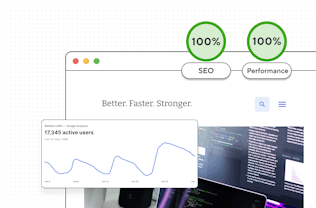
Screenshot of analytics for a CloudCannon site

Performance that actually performs

Astro's zero-JS frontend + CloudCannon's optional global hosting means instant loads worldwide. And structured data built right into your components gives you clean HTML that ranks, with no config headaches.

Load instantly. Rank higher. →

Less upkeep. No need to keep up.

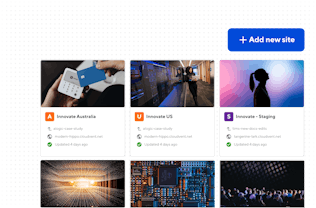
Top-tier performance with zero maintenance by default: keep your dev time for new features. Build out new Astro sites in minutes with your reusable page components.
Maintain less. Build more. →

Screenshot of CloudCannon's Visual Editor and active users

Real results from real migrations

Digital agency Absoluttweb migrated to CloudCannon.
The results? New sites can be developed 12x faster with zero maintenance, opening up plenty of scope for new clients.

Three steps to visual editing with Astro

1

Build with Astro

Build your Astro site locally with your preferred stack and structure.

2

Configure with CloudCannon

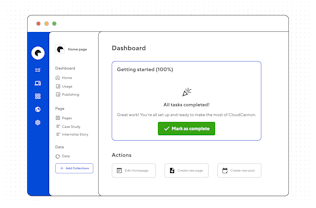
Configure collections, set editing rules, and transform your shortcodes and content blocks into visual components.
3

Hand off confidently

Hand off to non-technical editors who can update content visually — without touching your code.

Frequently asked questions

Do Astro content collections map to CloudCannon collections?

Yes. The mapping is close to one-to-one: you can define your Astro content collections as CloudCannon collections, and use your Zod schemas to create CloudCannon schemas, which define the shape of a new entry. When that’s complete, Editors will see grouped, filterable lists of blog posts or case studies instead of a file tree. Markdown and MDX both work, and frontmatter fields become typed inputs in the sidebar.

Can editors change content inside my .astro components, or only Markdown?

The usual route writes to Markdown frontmatter. A page stores an array of component blocks in its frontmatter, you describe those components as structures in your config, and editors add, reorder, and nest them in the Visual Editor with live previews. Component props become real form inputs, so nobody touches the .astro file itself. That's the page-building experience most teams are after.

The second route writes to the .astro file. With source editables, you add data-editable attributes to elements in a component and the edit saves back into the component source rather than frontmatter. It suits standalone pages like About or Contact, where you want full control over the markup and editors fixing copy, but no page builder. Anything you don't mark stays untouchable.

What about MDX? I don’t want editors importing components by hand.

They don’t have to. CloudCannon Snippets let you expose a component as a single item an editor inserts from a menu, with its props as form fields. The output is still the MDX import and component call you’d have written yourself, so nothing changes about how the file builds. We recommend using an auto-importer for the import of components into your content files, then you’ll just need to define the shape of each component in your Snippet configuration.

Do my React, Vue, and Svelte islands still work?

They do. CloudCannon runs your real astro build, so integrations, adapters for static output, hydration directives, and client-side islands all behave as they do locally. If a component renders in your build, it renders in the preview.

I’m running Astro in server mode with an adapter. Can I still use CloudCannon?

Yes, with one adjustment.

CloudCannon hosting serves static output, so if parts of your site render on demand you’ll keep deploying those to your existing platform. You’d need to run a static version of your build on CloudCannon to use Visual Editing, with static fallbacks for the server driven parts of your site. Or — if you can forego Visual Editing — you can use CloudCannon as a purely headless CMS, where a build isn’t required at all. With that in place, you can connect CloudCannon to the same repository, let your editors commit through it, and your current build pipeline picks up the changes exactly as it would a developer’s push.

External hosting is covered in the docs.

Which Astro version do you build with?

Whichever one is in your package.json. CloudCannon has npm, pnpm, and yarn available and runs your install and build commands, so upgrading Astro is the same commit it always was. You can pin your Node version if your project needs a specific one.

How much rework does an existing Astro site need?

Less than you’d expect. Most of the setup is a cloudcannon.config.yml file that describes your collections and inputs, plus editable region attributes on the components you want editors touching. You can do this incrementally: get the Content Editor working first, add visual editing to your page-building components later. Our agent-skills repo automates a good chunk of the migration if you’d rather hand it to an agent.

What happens to my repository?

Nothing unusual. Editor changes arrive as ordinary Git commits on a branch, with the same file structure and the same Markdown you’d write by hand. If you stop using CloudCannon tomorrow, you’re left with a working Astro site, and your content is in plain markdown in the repo that you own.

No vendor lock-in. Ever.

Your Astro code and content stay in Git.
Your repos stay yours.

Tiaan Fairchild

Software Engineer

A friendly CloudCannon dev sitting ready for a demo call