Redesigning CloudCannon’s docs with Diátaxis, Lume, and Pagefind


For the past year, we’ve been busy redesigning our documentation site. Now that it has finally launched (🎉 😍 📖), let’s take a look at what has changed and the decisions that went into creating the new experience.
Finding the right framework Direct link to this section
Over the last couple of years, we’ve been working to improve our documentation, including its content, information architecture, and design. To do this, we’ve adopted a modified version of Diátaxis: a systematic approach to structuring our documentation based on the reader's needs. Many tech companies in our field use this framework, and I’ve found it genuinely useful for thinking about how our users approach documentation and identifying gaps in our knowledge base.
Diátaxis works by answering two key questions: how much do you already know about the subject, and are you trying to learn something or actively do something? Depending on your answers, you’ll want different types of content. Here's how they're separated in principle:
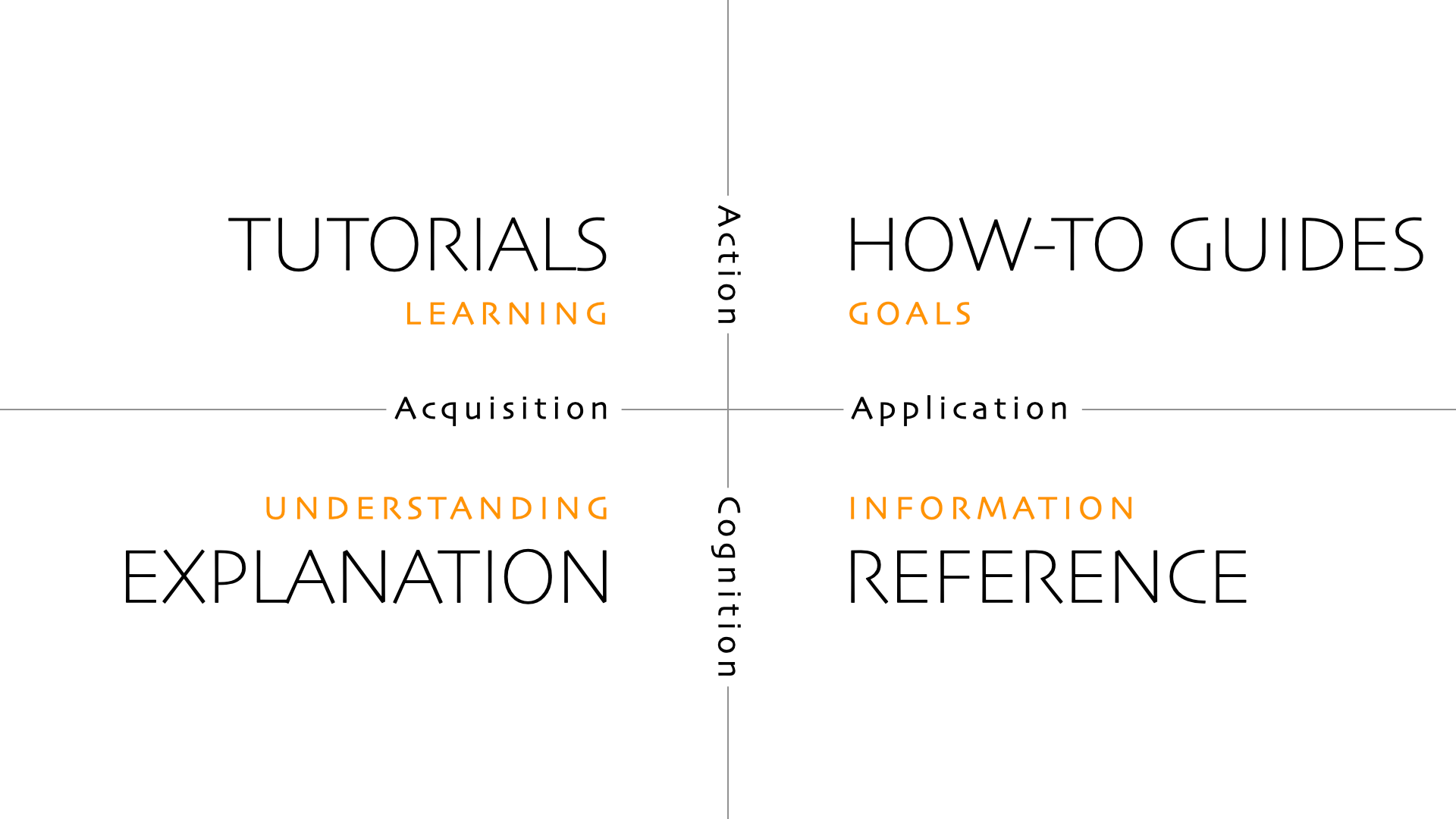
Why is this important? I always think about the experience of looking up a recipe online — you know the bit where you scroll past four paragraphs about someone’s grandmother before you get to turn the oven on? When you need that context, you don’t mind reading the whats and the whys, but when you just want to know how to do something, it can be annoying to search for that information when it’s buried in extra detail. Writing documentation with the reader’s intention in mind can ease that friction and make the overall experience easier.
Building a clearer structure Direct link to this section
So what does Diátaxis look like for CloudCannon?
If you’re a beginner with CloudCannon or need a more context-heavy introduction to a feature, the new documentation site has Explanation articles for those who want to understand a topic, and Guides when you want to achieve a specific goal and learn while you go (the Diátaxis model calls these Tutorials, but we’re sticking with our historical terminology).
If you are a more experienced CloudCannon user (or prefer to figure things out along the way), our new documentation has a Reference section for those who want to learn about our configuration keys, and Instructions (the Diátaxis model calls these How-To Guides) for context-light step-by-step instructions to achieve a specific outcome. Here's how we've separated our sections:
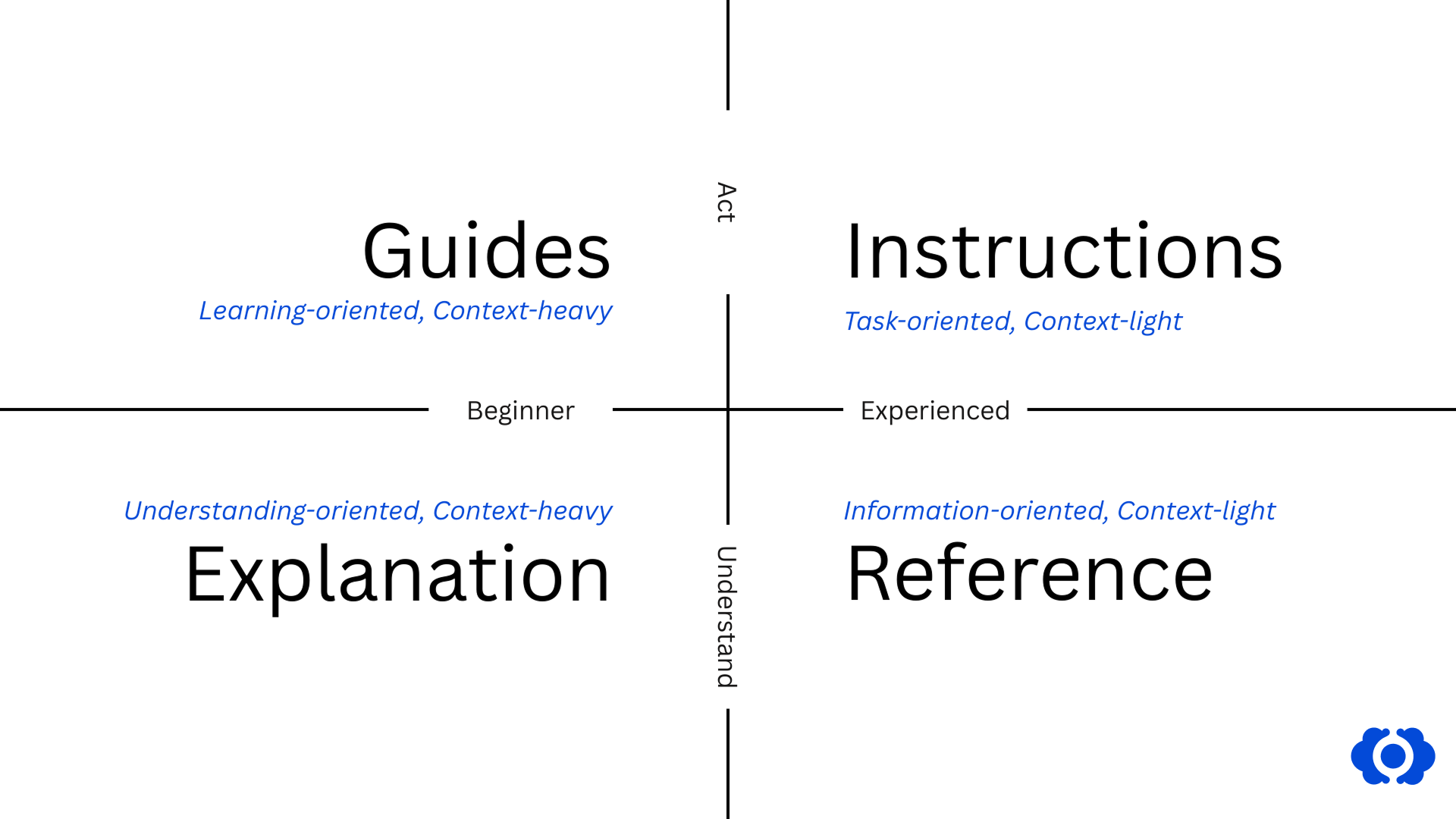
Embracing (and adapting) the Diátaxis framework informed our redesign. For example, the old documentation design didn’t have a good place to store Reference information. You often had to scroll to the bottom of pages, or already know which article a key was defined in.
By separating Reference information into its own section on the website, developers can now quickly look up key names and their possible values without having to read through contextual explanations. This streamlined approach means you can find technical details at a glance. Everything’s now in one place where it's easy to explore and reference as you're building.
Documentation for everyone on the team Direct link to this section
It’s not just developers who will get use out of our new documentation: it now serves a broader audience. While developers have always been our core readers, we’ve heard your feedback asking for more articles to support non-technical team members. To achieve this, we’ve split our documentation into 'Users' (for people who manage content, teams, or billing) and 'Developers' (for people who maintain and customize CloudCannon).
Below you'll see a comparison of one of our pages aimed at Users, now given a clearer menu hierachy, adjusted content, and the option to choose dark mode:
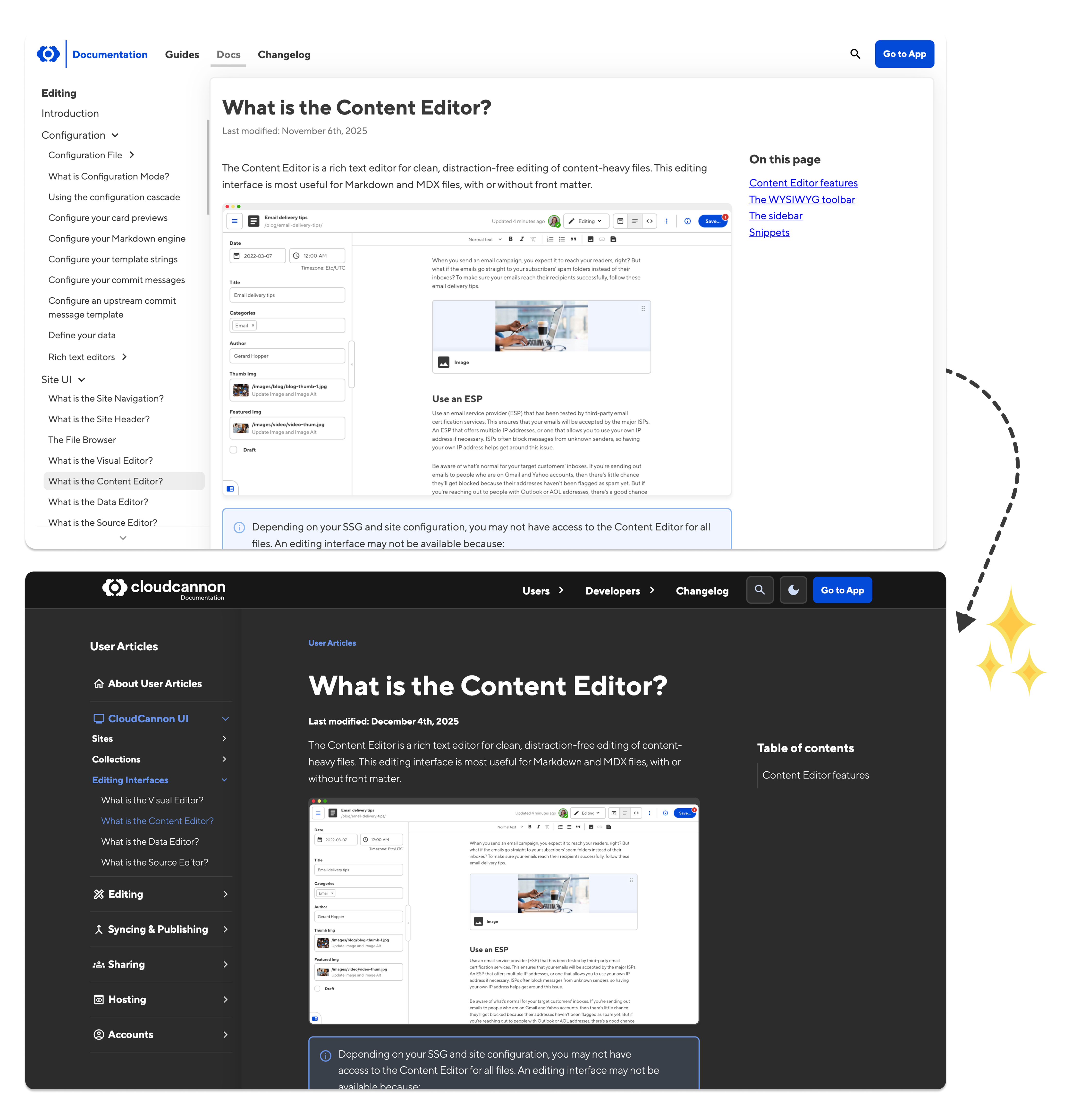
Of course, we know that Developers are often also Users, or want to know what the app experience will be like for the teams they configure it for. We also know that more complete user documentation will help our agency partners when they're creating resources for their clients.
For these reasons, our search functionality spans both Users and Developers sections, so you’ll find what you need regardless of where it lives. The top navigation should make it easy to move between User and Developer content, and related resources at the bottom of each article connect you to relevant information across both sections based on topic.
Collaborating on the redesign Direct link to this section
This redesign was a team effort! As CloudCannon’s technical writer, I had some direction in mind, but the project really came to life with the help of Vic, Adon, Ross, and George.
Our amazing Victoria Roberts handled the UX and UI design. She has an amazing understanding of modern website design components and the functional knowledge to back it up — things like optimal line length for reading comprehension, navigation structure, and designing reusable components rather than creating boutique custom elements for every page. I enjoyed working with her, especially when she asked questions I hadn’t even thought about, which helped extract what we actually needed from the site.
One thing Vic and I were excited about was the introduction of dark mode for the docs, which you can toggle from the main navigation:
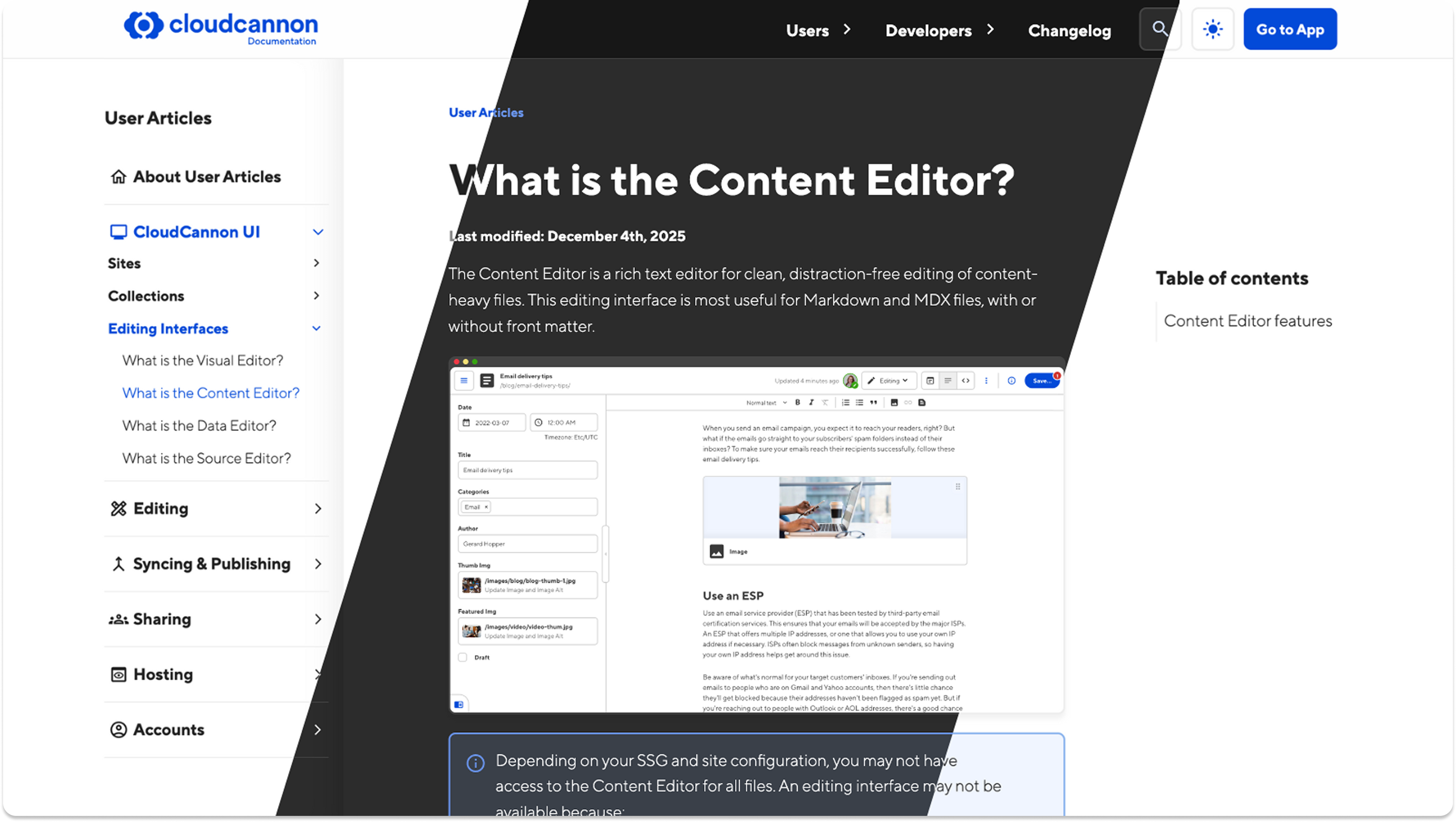
Adon Moskal, Ross Phillips, and George Phillips handled the development. Adon was particularly helpful in getting the editing experience right for me as a technical writer, including configuring CloudCannon editing for our documentation site and ensuring the appearance matched the designs. George and Ross came on board in the later phases, and Ross helped set up something I’d been wanting for a long time: a repository that acts as a single source of truth for all our configuration keys.
This repository lets me update a key definition in one place, and it propagates everywhere — through to the docs, to our developers’ IDEs, and eventually to other locations (we’re still working on these; nothing concrete to announce just yet). The big advantage for me is that I don’t have to update the same definition on every single page where it appears. We’re all talking about the same thing now.
Under the hood: migration, tooling, and what stayed the same Direct link to this section
We’re still using Lume as the static site generator behind our new docs site. Partly this was so we could keep a lot of our behind-the-scenes architecture, and partly because I find it so reliable — our builds are fast, and working with components is straightforward. We also liked the idea of having our marketing website built with one SSG (11ty) and our docs website with another: it shows in practice that CloudCannon works with whatever SSG people use. And running the docs site as a subpath on cloudcannon.com lets our docs and marketing teams work independently, using the SSGs we prefer. It’s much more efficient than trying to update a monolithic site with a single build process!
Migrating the content to the new site was straightforward but involved some decisions. We had to determine whether each Article was more appropriate for Users or Developers and split them accordingly. All our existing Guides ended up in the Developer section, which highlighted a gap: we need more Guides for people using CloudCannon for specific tasks, rather than configuring it for custom experiences. We also restructured our changelogs to display by year in the new Changelog section.
Because we maintained both the old and new docs simultaneously for several months, we created a migration script that could move content over whenever needed. Every time we added a new changelog, feature, or guide to the old docs, that script ensured it came across to the new docs.
We’re also still using Pagefind for search, but we’ve implemented the new and improved version that’s currently in beta (v1.5.0-beta.1). This version gives us much better control over search functionality and result ranking, as well as a new UI update that makes it easier to create our own modals and components.
Writing in the new site Direct link to this section
My editing experience has also improved. Like a lot of technical writers, I write directly in the Content Editor, occasionally switching to my own IDE. With the new site using Unified Configuration, I’ll soon be able to make the most of Editable Regions and write directly in CloudCannon’s Visual Editor with inline editing. This will allow me to write in context with our amazing new design and ensure I know exactly how it will appear on the live site.
For now, though, I’m perfectly happy in the Content Editor with my updated library of custom rich text snippets — code blocks, notices, and documentation screenshots — to make the writing process smoother.
The new code blocks are particularly nice: they adapt to light and dark mode, can show content in several languages, and I can add annotations to highlight specific lines without those markers being copied when users grab the code.
We want to hear from you Direct link to this section
I’ve been excited to release this project for a long time now, but there’s still one thing I’m missing: feedback from you!
If you’d like to poke around, our documentation repository is fully open on GitHub. You can see behind the scenes for every snippet, component, and how everything’s put together with Lume and CloudCannon.
We first did this for transparency — always a good default — but these days the way people consume documentation has changed. With the prevalence of AI coding assistants, I’m now writing for both human eyes and the agents that scrape our documentation to answer user questions. Having the repo open means devs who prefer using AI agents can access our entire codebase as a resource for their CloudCannon projects.
I’d love feedback on several aspects of the new site. If you work with or are a non-technical user, I’m interested in whether the new design helps you achieve your goals. If you’ve had issues with our search function in the past, please tell me if things have improved. And if you’re a power user who relies heavily on our documentation, your opinion on the change really matters — the whole point of a documentation website is delivering accurate, clear information to the people who use it most.
You have three ways to provide feedback: through support, in our community under the Docs Feedback section, or via pull request directly to our GitHub repo. I’m looking forward to hearing what you think!
Let us know what you think
Take the new docs for a spin and share your thoughts with us.