Subscribing to CloudCannon gives you access to features that improve how your team edits content, collaborates, and publishes your Sites. As your team grows, you can move to a higher Subscription Plan A set of features available to your Organization, the monthly usage limits for resources, and the price you pay for access to those features and resources, monthly or annually. Each Organization in CloudCannon can have one Subscription Plan, and can update or cancel at any time.Subscription Plan
There are three Subscription Plans to choose from, each aimed at a different size of team, with different requirements. For the most up-to-date list of what each Subscription Plan includes, take a look at the CloudCannon pricing page.
Your Free Trial#
When you created your Organization A workspace in CloudCannon that groups together Sites, Organization Members, and shared resources. It is also the unit CloudCannon bills for. You can define permissions for your Organization, controlling the access each Organization Member has to resources on CloudCannon. You can create and be a part of multiple Organizations. A trial period that gives a new Organization access to Standard Plan features without requiring a payment method. The ongoing payment to CloudCannon for your Organization's Subscription Plan. A Subscription can be active, paused, or canceled. Canceling a Subscription will prevent you from paying for further use of features and resources without deleting the Organization, its Sites, or files.Organization
Free Trial
Subscription
If you own the Organization, you can track how many days you have left in the Trial Countdown in the App Sidebar The left-most UI panel in the CloudCannon app. This panel contains links to your Organization Home, Sites, Projects, Domains, and Org Settings pages, as well as app Updates and your Avatar.App Sidebar


You can subscribe to CloudCannon at any time, whether your Free Trial is still running or has already ended:
- Part way through your trial — You can select a Subscription Plan and add a payment method whenever you are ready. CloudCannon will not bill you until after your Free Trial has ended.
- After your trial has ended — If your trial finishes without a payment method, CloudCannon pauses your Subscription. Your Organization, Sites, and files stay intact. Selecting a Subscription Plan and adding a payment method will start your Subscription immediately.
Compare Subscription Plans#
A Subscription Plan defines:
- A set of features available to your Organization.
- An amount of Organization Membersand Custom DomainsGlossary term
Organization Member
A person who belongs to the same Organization as you. Organization Members are other CloudCannon users who have been invited to your Organization to collaborate on Sites, edit content, or manage settings. Each Organization Member has their own CloudCannon account with individual permissions assigned through Permission Groups, and uses one Seat in your Subscription Plan. Organization Members were previously called Team Members.
for your Organization.Glossary termCustom Domain
A unique address used to identify a website, such as cloudcannon.com. You can purchase a domain from a Domain Registrar and add it as a Custom Domain to your CloudCannon Organization before connecting it to any number of Sites hosted on CloudCannon.
- The monthly usage limits for resources like Hosting Bandwidthand Build TimeGlossary term
Hosting Bandwidth
The amount of data transferred from your hosted Site to visitors' browsers, determined by visitor count and webpage size. Each Subscription Plan includes a set amount, and you can enable Overages to keep your Sites live if you go over this amount. You can review your usage under the Usage tab of your Site Dashboard or Organization Home page.
.Glossary termBuild Time
The total time CloudCannon spends building your Sites, measured cumulatively across all builds in a month. Most Subscription Plans include unlimited build time. On plans with a build time limit, you can enable Overages or purchase additional build time if you need more. You can review your usage under the Usage tab of your Site Dashboard or Organization Home page.
- The price you pay for access to those features and resources, monthly or annually.
Each Subscription Plan includes a set amount of these resources, and you can purchase more of any of them at any time:
- Organization Members — Add people who can access, edit, or create content for your Organization. This includes people you invite to your Organization, people you invite to a single Site through Site Sharing, and each Site with Guest AccessGlossary term
Site Sharing
A CloudCannon feature that allows you to invite an existing Organization Member from within your Organization to view, edit, and publish content for a specific Site. With Site Sharing, you can control what an Organization Member can interact with by limiting access to individual Sites rather than all Sites in your Organization. This is distinct from Guest Access, which is used to invite external clients who don't have CloudCannon accounts.
enabled.Glossary termGuest Access
A CloudCannon feature that allows you to invite someone from outside your Organization to view, edit, and publish content for a specific Site. Unlike Site Sharing, Guests invited through Guest Access do not need a CloudCannon account. Instead, they log in using a Guest Password through a dedicated Guest Login Page. Each Site with Guest Access enabled uses one Seat, regardless of how many Guests use its password. The Guest Access feature was previously called Client Sharing.
- Custom Domains — Add additional Custom Domains to your Organization, which you can connect to any number of Sites. This includes your apex domain and any subdomains (e.g.,
jetstream.com,www.jetstream.com,shop.jetstream.com) but not subpaths (e.g.,jetstream.com/blog). - Build Time — Allow your Organization Members to spend more time on Site builds, in 1-hour bundles rounded up to the next full bundle. This only applies to Subscription Plans that limit Build Time.
- Hosting Bandwidth — Allow your Sites to serve additional website traffic, in 100 GB bundles rounded up to the next full bundle.
Which Subscription Plan is right for your Organization will depend on if you need access to a specific feature, expect to use a certain amount of resources, and whether you want to pay monthly or yearly.
Each Organization in CloudCannon can have one Subscription Plan, and owning multiple Organizations results in separate billing.
To see the available Subscription Plans in the app, click Org Settings The settings page for a CloudCannon Organization, where organization administrators can manage organization-wide settings, including billing, team permissions, integrations, branding, and security policies. You can access this page using the Organization Settings link in the App Sidebar.Org Settings
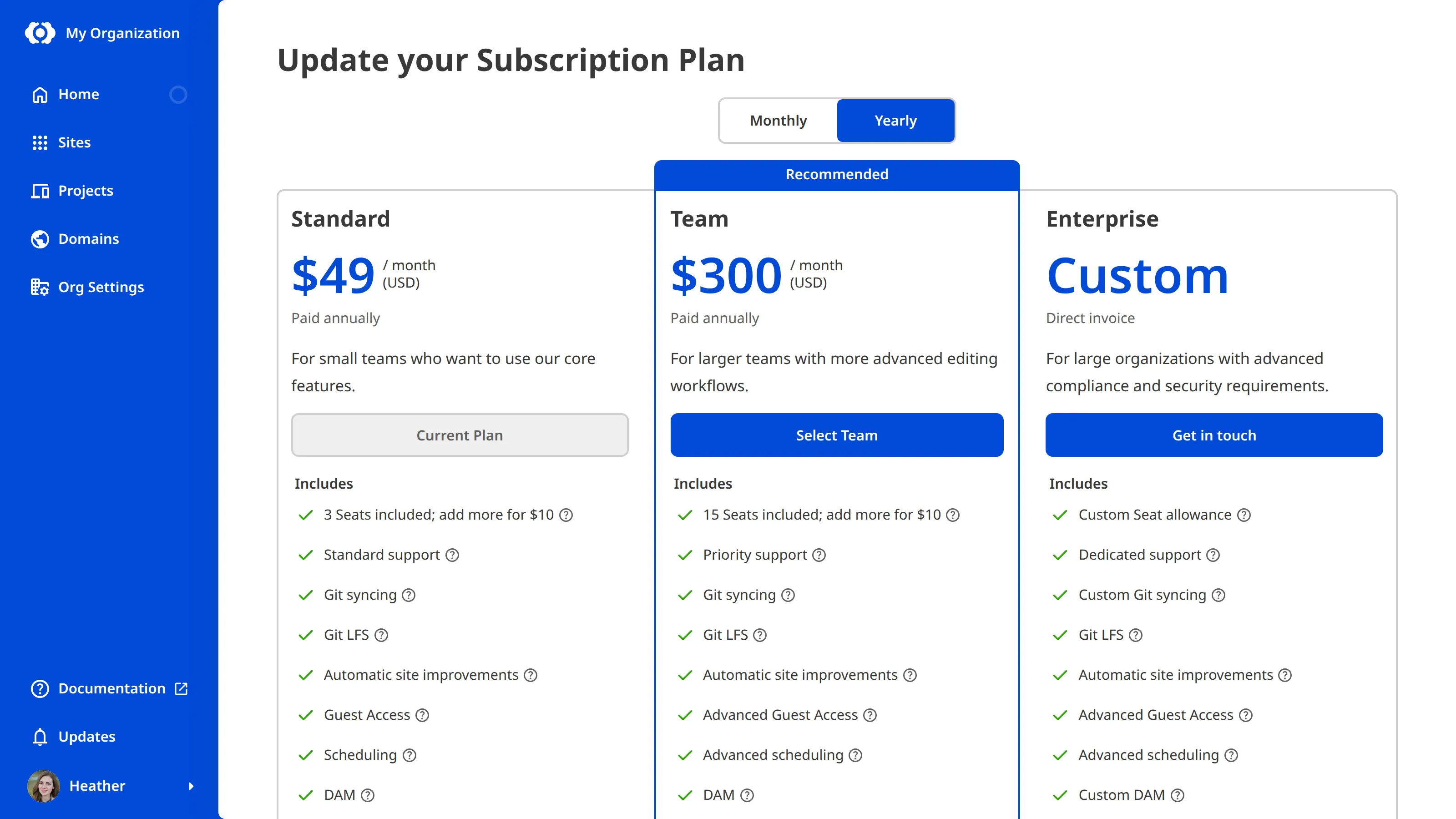
CloudCannon offers three paid Subscription Plans: the Standard Plan, Team Plan, and Enterprise Plan.
- The Standard Plan offers CloudCannon's core editing, publishing, and collaboration features, with resource limits appropriate for small teams and unlimited Build Time.
- The Team Plan offers everything from the Standard Plan, plus advanced publishing workflows, Custom Permission Groups, and priority support. It also includes more Organization Members, Custom Domains, and Hosting Bandwidth.Glossary term
Custom Permission Group
A user-defined set of permissions and access controls in CloudCannon that can be assigned to Organization Members. Custom Permission Groups allow fine-grained control over what users can see and do within your Organization.
- The Enterprise Plan offers everything from the Team Plan, plus Single Sign-On, custom billing arrangements, and a dedicated account manager, with à la carte resource limits and options for teams with advanced security and compliance requirements.Glossary term
SSO/SAML
An abbreviation of Single Sign-On/Security Assertion Markup Language, SSO/SAML is an authentication method that allows users to access multiple applications with a single set of credentials. CloudCannon supports SSO/SAML for Enterprise Plan customers. With SSO/SAML, rather than logging in to CloudCannon directly, CloudCannon authenticates the user's identity using their Identity Provider software.
If your Organization's requirements fall between these Subscription Plans, choose based on the features you need, since you can add more resources to any Subscription Plan. We'll cover that further in the next step of this guide.
Select a Subscription Plan#
Once you have decided which Subscription Plan you want, you can select whether to pay for it on a monthly or yearly basis. This is called your Billing Period The recurring cycle CloudCannon bills your Organization on for its Subscription Plan, either monthly or yearly. You can switch between billing periods at any time, and CloudCannon prorates the difference on your next invoice.Billing Period
The Billing Period toggle at the top of the Update your Subscription Plan page allows you to see how the price of each Subscription Plan changes. Paying on a yearly Billing Period is discounted, compared to monthly.
Click the Select [Plan Name] button for the Subscription Plan and Billing Period you want.
Selecting a Subscription Plan takes you to the Your Subscription Plan page, where you confirm your choice.
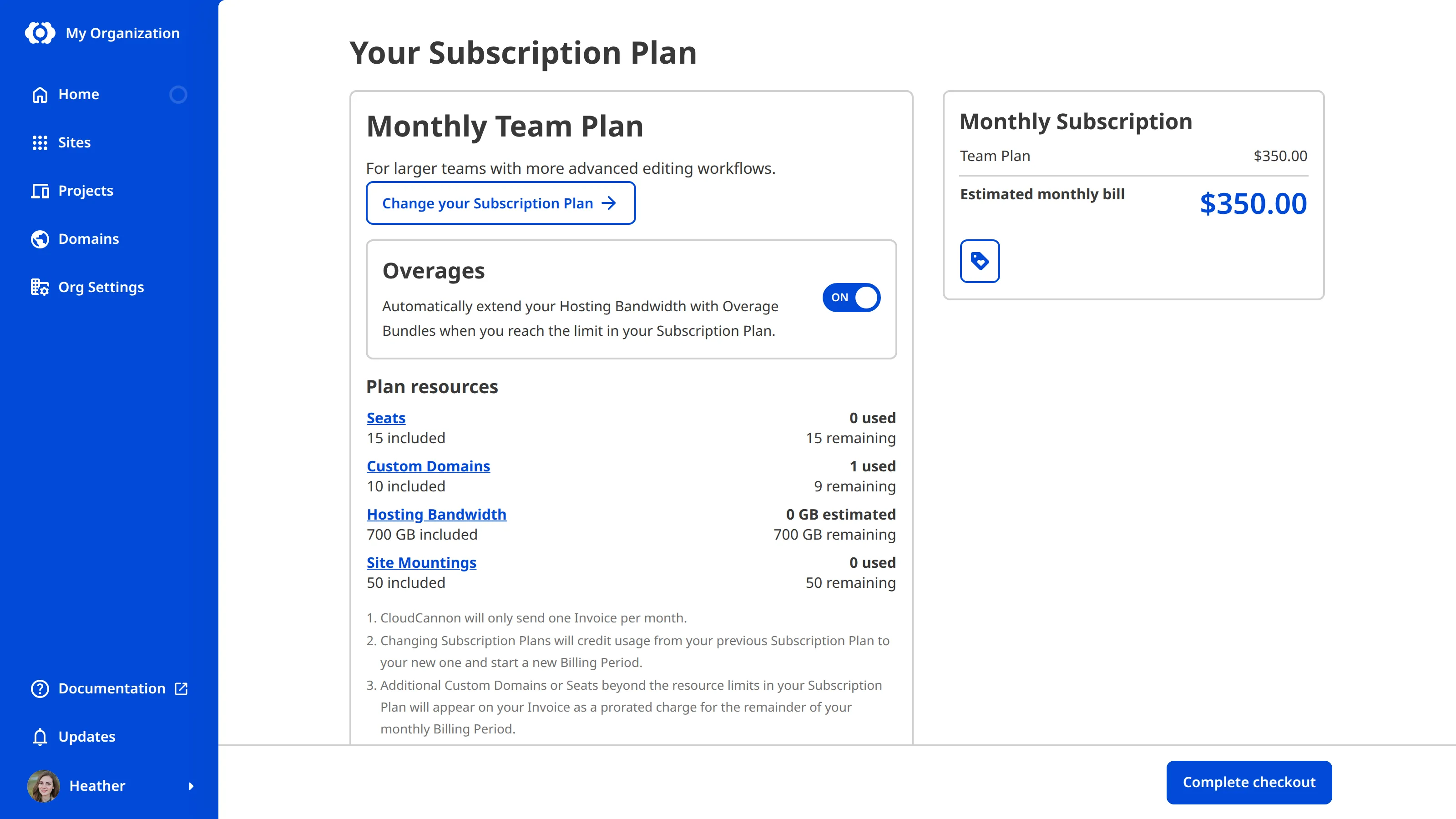
In the next step of this guide, we'll set up Add-Ons and Overages for when you need more than your Subscription Plan includes.